
Blade Ball script
Ray Script
Combat, detection, player controls, visuals and utilities. A separate digital software license.
7 daysFixed-term access
$2.99USD
30 daysFixed-term access
$9.99USD
LifetimeNo fixed expiry
$24.99USD
Ray / Script
The full Ray product with Combat, Detection, Player, Visuals, Changer, Blatant, Misc and Settings modules in one consistent interface.
Plans & pricing
Prices in USD. One payment for the selected license term. Macro and Script are purchased separately.
Combat, detection, player controls, visuals and utilities. A separate digital software license.
Each plan provides access to the selected product for its stated term, with setup guidance and support through Discord tickets. Check the seller’s delivery and activation instructions before paying.
Lifetime has no fixed expiry date; it does not guarantee that Ray or third-party platforms will operate forever. Checkout shows the final currency, fees and available payment methods. The listed plan prices apply to all sellers.
Read purchase & refund terms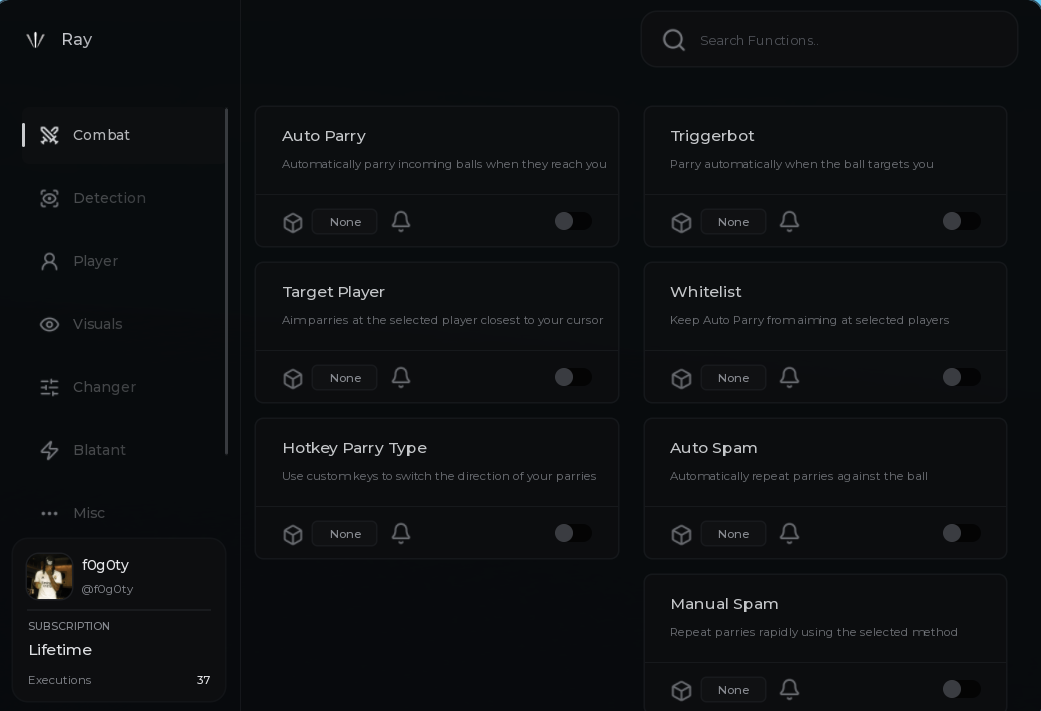
User guide updated October 26, 2026. Choose one of the eight tabs, then expand a feature to learn what it does and how to adjust it. Detection abilities are now independent modules, and Misc includes both AI Play and Anti AFK. Saved profiles keep your chosen values and panel positions; first-use defaults apply when no value has been saved.
Automatically parries incoming balls using your selected timing, range and curve settings. You can also use Auto Parry with Immortality or Invisibility.
Immediately performs a parry when the active ball switches its target to you.
Select one or multiple alive players and optionally target by equipped ability. Ray considers both your selected players and players with your selected abilities, then chooses the one closest to your cursor. Target Player and Whitelist cannot stay enabled at the same time; Target Player takes priority.
Keeps selected players out of Auto Parry target selection and can also whitelist players by equipped ability. Name selection, Whitelist Friends and Selected Abilities work together. Whitelist is mutually exclusive with Target Player; enabling Target Player disables Whitelist.
Assigns dedicated keyboard or supported mouse buttons for changing the active parry curve without reopening the menu.
Runs repeated parry attempts using the configured threshold.
Separate manual spam module for repeated parry attempts.
Independent detection module that pauses Auto Parry while Infinity Ball is active. It no longer depends on a shared Ability Detection master switch.
Independent detection module that pauses Auto Parry during an active Death Slash state.
Independent detection module that pauses Auto Parry while your Time Hole ability is active.
Handles the Slashes Of Fury sequence as its own detection module and repeatedly parries according to the configured limits.
Handles Phantom independently and clears its active focus state immediately when the module is disabled.
Detects the local Hell Hook attachment and applies the position-lock response while the module is enabled. Disabling it stops the Hell Hook handler.
Avoids Auto Parry actions while the local supported MaxShield / Force Field state is active.
Responds to supported Dribble fake-highlight events as an independent detection module.
Removes the supported Quasar blindness atmosphere effect while this module is enabled.
Keeps the camera stable during the supported Quasar disorientation effect and clears the saved Quasar camera state when disabled.
Checks players against the configured creator-group rank threshold.
Moves the camera smoothly to your selected FOV over about 0.35 seconds. Changing the slider during a transition continues from the current view. Turning the module off smoothly restores the FOV captured before it was enabled.
Changes the local gravity strength while enabled. Lower values reduce downward acceleration; higher values increase it. Turning Gravity off restores the exact value captured before enabling it.
Applies your selected movement speed to the current character and reapplies it after respawning. Turning it off restores the value captured for that character before the override.
Enable Jump Modifier, then select the options you want. No Double Jump, Jump Power, Multiplier and Slow Fall are independent settings and are off by default. With No Double Jump disabled, the first two jumps are handled by the game, including its stronger second jump; additional jumps are added only after that native second jump is detected when Multiplier is enabled. With No Double Jump enabled, only one jump is allowed per landing, and it takes priority over Multiplier and native extra jumps.
Spins your character while enabled. The speed is now ten times faster at the same slider setting. Spin Bot takes priority while Back Walk is also enabled; normal turning is restored when both are off.
Turns the character to face away from its movement direction, so forward, backward and sideways movement appears to be performed backwards. It changes the character’s facing direction without reversing movement controls. Spin Bot takes priority if both are enabled.
Keeps your chosen time of day while enabled. Turn it off to restore the time shown before you enabled it. This changes your view only.
Changes the sky you see to a built-in or custom preset. Your chosen sky stays active until you turn the feature off, which restores the original sky. This changes your view only.
Adds an ability label above active players.
Hides parry animations on your screen while enabled.
Disables supported combat visual effects while the module is enabled.
Displays a draggable BALL STATS panel with current velocity in studs per second, peak speed and the tracked ball’s current target. The target badge highlights when the ball is targeting you and shows NO TARGET when no target is available. When several balls are active, tracking prioritizes a ball targeting you, then the shortest estimated arrival time. Drag the panel header with a mouse or touch to move it.
Displays a brief visual hit effect whenever a successful parry is registered.
Adds configurable trail ribbons to the active ball.
Applies the selected local sword appearance and can locally expose individual swords or the full sword catalog through Blade Ball's shop interface.
Changes the kill-explosion effect you see and lets you preview individual explosions or the supported catalog in the shop. Your selected effect stays applied when you change swords or equipment. These appearance changes are local.
Loads and plays supported Blade Ball emotes locally and can expose locked emotes through the native Blade Ball Emotes interface.
Shows your selected title on your screen.
Copies another user's avatar appearance to your local character and reapplies it after respawn.
Replaces the locally displayed win-streak amount.
Changes the local announcer text shown for wins and kills.
Moves the character around the active ball using configurable orbit parameters.
Removes the cooldown shown locally for supported Thunder Dash actions while enabled.
Enable during a round to place the desync position 7 studs below your current position. It follows your horizontal movement without the random movement used by Immortality. The depth is relative to your character, so it does not guarantee full concealment on every map. Invisibility takes priority over Immortality while enabled.
Enable during a round to use a changing desync position around your character. Adjust Radius and Height to change its range. Invisibility takes priority if both features are enabled; Immortality resumes when you turn Invisibility off.
Removes the client FPS cap and restores the exact previous limit when turned off. This removes a cap; it does not guarantee higher FPS on hardware-limited systems.
Automatically moves your character around the arena using the active ball position, movement curves and optional player avoidance. It can also jump, double-jump and vote in the lobby. Turning AI Play off disconnects its movement updates and stops the character.
Enable Misc → Watermark to show the Ray logo and name. It starts in the upper-left corner and stays visible when the main menu is hidden, including in Vanilla UI. Drag the watermark with a mouse or touch to reposition it. Watermark, FPS and Ping are off by default; with both statistics off, only Ray branding is shown. Turning the module off hides it and stops updates; Unload Ray removes it.
Triggers the available rematch action when the result interface appears.
Reduces client rendering/effects while the module is enabled.
Enter an FFlag value, enable the module to apply it, then disable the module to restore the previous value.
Plays a configurable local sound whenever a successful parry is detected.
Applies local Headless and Korblox appearance changes.
Switches to a Blade Ball-style interface while keeping your features, settings and shortcuts.
Switches Ray between PC and mobile interaction behavior. On touch-only devices Mobile Mode is enabled by default, but it can be toggled on any supported device.
Applies a full interface palette. Disabling the Themes module restores the default Dark palette.
Controls the optional gradient layer used by supported Ray titles and interface accents.
Unlocks Ray window resizing while keeping the interface proportions consistent.
Lets you replace the default Insert shortcut. Disabling this settings module restores Insert.
Changes toggle behavior so the entire interface is hidden instead of using the normal toggle presentation.
Enables or disables Ray UI transitions and lets you tune their speed.
Save your feature selections, controls and settings as named profiles. Profiles also store positions for the main Ray window, Vanilla UI, Watermark and Ball Stats. Enable Autosave Selected to retain changes automatically, and Autoload Selected to restore that profile on startup. File saving requires the executor’s file API.
Restores the Settings tab to its defaults, including its shortcuts, notifications, mobile buttons and window layout. The reset settings are saved.
Turns off active Ray features and removes the Ray interface from your current session.
Here to help
Join the Ray server and create a support ticket for delivery, activation, setup or purchase questions.


