
Desktop macro
Ray Macro
Configurable timing profiles, input rate and hotkeys. A separate digital software license.
30 daysFixed-term access
$4.99USD
LifetimeNo fixed expiry
$9.99USD
Ray / Macro
A configurable Blade Ball macro with timing presets, adjustable send rate, adaptive speed, hotkeys and a compact desktop interface.
Plans & pricing
Prices in USD. One payment for the selected license term. Macro and Script are purchased separately.
Configurable timing profiles, input rate and hotkeys. A separate digital software license.
Each plan provides access to the selected product for its stated term, with setup guidance and support through Discord tickets. Check the seller’s delivery and activation instructions before paying.
Lifetime has no fixed expiry date; it does not guarantee that Ray or third-party platforms will operate forever. Checkout shows the final currency, fees and available payment methods. The listed plan prices apply to all sellers.
Read purchase & refund terms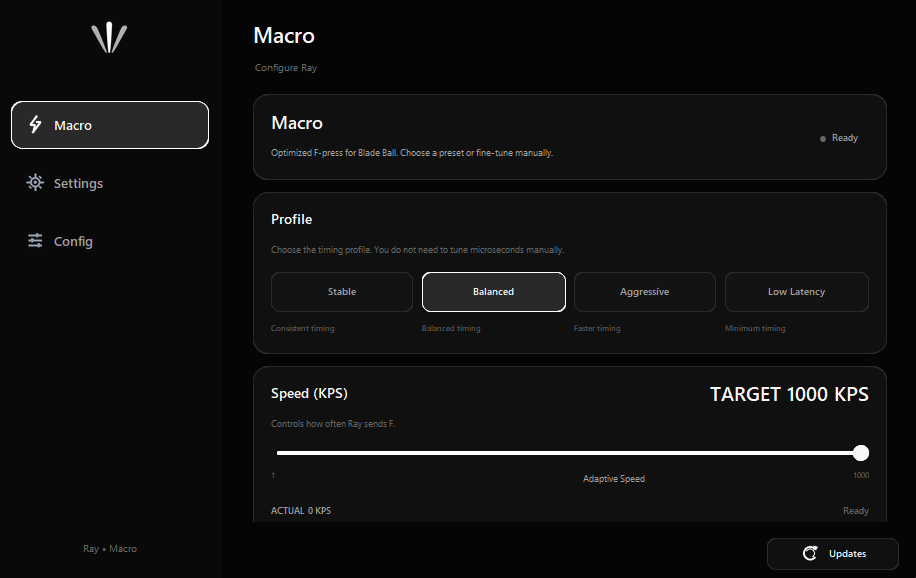
Everything below describes controls visible in Ray Macro. Open a section and then expand a setting for details.
Selects the timing profile Ray uses before sending the configured input.
Sets the target input rate used by the macro. The current target is shown directly above the slider.
Allows Ray to adapt the send rate instead of relying only on one fixed target value.
Sets the key or mouse button that controls the macro. The selected binding is saved in the current configuration.
Toggle mode switches the macro on or off with each press. Other available modes depend on the installed build.
Switches the Ray interface between the available languages.
Pins the Ray window above normal desktop windows while enabled.
Shows a smaller status view for quick access to current macro state and speed.
Sets the key used to open or hide the main Ray interface.
Displays the currently saved Blade Ball profile, speed, hotkey, activation mode and adaptive-speed state.
Resets the saved Ray Macro configuration back to its default settings.
Here to help
Join the Ray server and create a support ticket for delivery, activation, setup or purchase questions.


